What’s the difference between a Public and Private volunteer profile in Volunteer Success

By: Volunteer Success

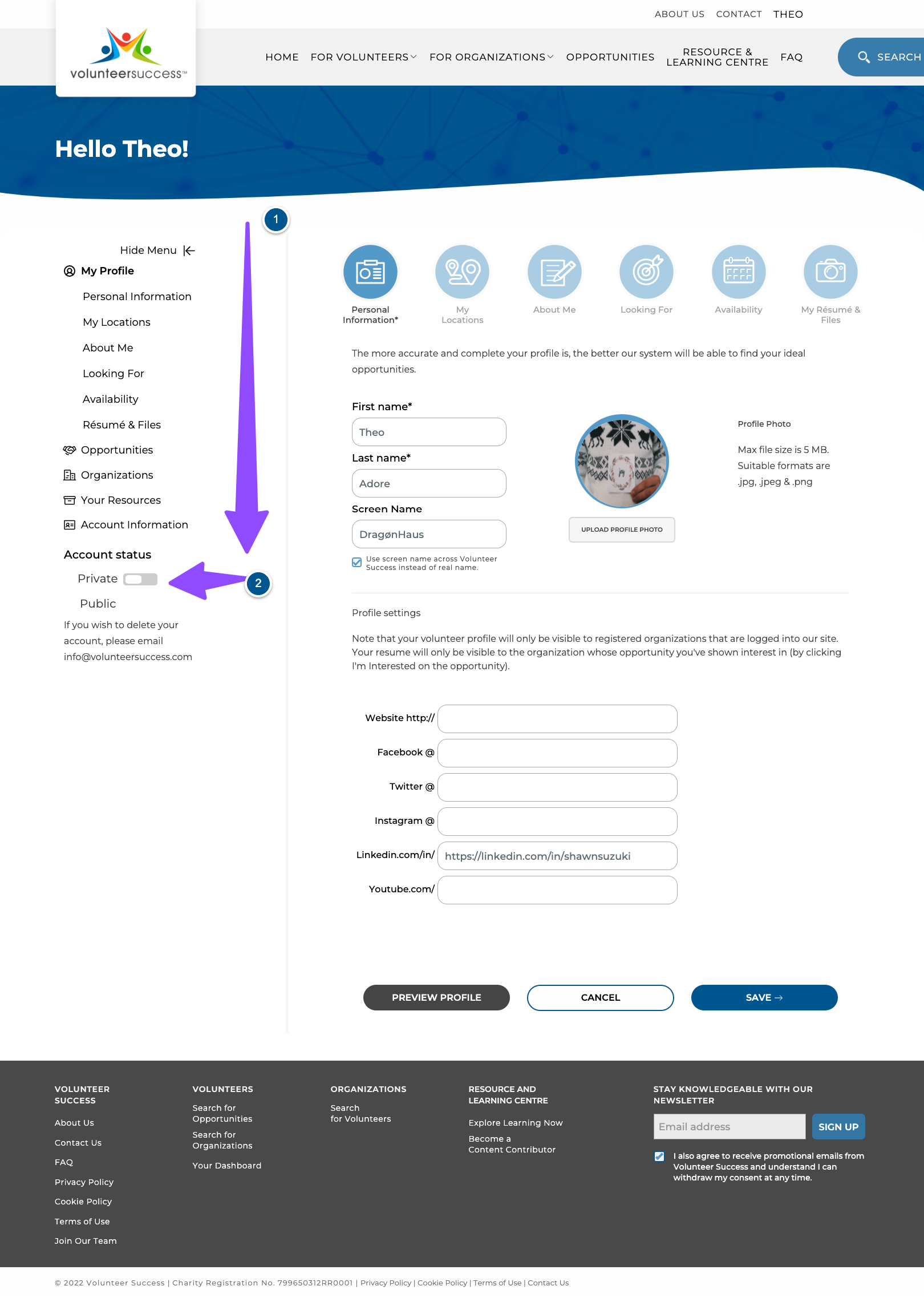
When you navigate to your personal volunteer profile in Volunteer Success, you may have noticed that there is an option in the dashboard for you to change your account status to either private or public. When your profile is set to public, your profile is visible to organizations only when they are logged into their Volunteer Success account. Changing to private means that your profile will no longer be visible to organizations in the search page. However, even in the private setting, you will still be able to apply to opportunities by selecting “I’m Interested”. Organizations will then be able to see your full profile in their Manage Volunteers dashboard.

To find the Private/Public toggle switch, log into your account and click on My Profile and it will show up towards the bottom of the menu.

Why might you wish to use the private setting? You may prefer to not be contacted by organizations other than those to which you have applied. We also recommend that underage volunteers also use this setting.

At Volunteer Success we are committed to protecting your data privacy. We have a comprehensive Privacy Policy and Cookie Policy, which will help you better understand how we legally collect and use your personal data.

If you have any other questions, we’re here to help! Contact us at support@volunteersuccess.com


Also read…

The Happiness Advantage

By: Tony Goodrow

Assuming that we could all use a little boost of happiness these days, I want to share some thoughts from a great book with you. If you get something out of it, I highly suggest getting your hands on the book for the full read. Below is a mix of Achor’s words directly from his book, The Happiness Advantage, my own summary of some of his points and my own reflections, including some thoughts on how this might be applicable to volunteer or donor management. Many of us have been taught that if we become successful, we will then become happy. The success, we’ve been told, has to come first. But Shawn Achor calls that whole notion into question. Recent research in the fields of positive psychology and neuroscience have proven that we’ve had the order in the relationship between success and happiness all wrong. It is not that success leads to happiness, but rather, that happiness leads to success. Doctors in a positive mood demonstrated almost 3 times more intelligence and creativity in diagnosing a case than doctors in a neutral state, and they made accurate diagnoses 19 times faster (and all it took to make them think happy thoughts was to be given a lollipop!) Optimistic salespeople outsell pessimist salespeople by over 50% Students made to feel happy about something before a math test outperform their neutral peers This has three important ramifications in volunteer management and donor relations. If you start your day or ready yourself for a challenging task by reflecting on things that make you happy or doing something that makes you happy, you’ll perform better for it. The environment in which your volunteers are engaged clearly matters. If they are happy, what they will succeed in accomplishing for you will go up. Campaigns encouraging donors to give out of a sense of happiness create a different experience with your organization than campaigns encouraging donors to give out of a sense of guilt. Happiness can act as an inoculation against stress. Tax season, as you can imagine, is a very stressful time for tax auditors. To put his seven principles to the test, Achor delivered three hours of positive psychology training to 250 managers at KPMG. When tested again later on, those auditors that had gone through the training reported significantly higher life satisfaction scores and lower stress levels than the control group who had not received the training. Change is possible. You might think that you are who are and that’s that. A growing body of science is teaching us that this just isn’t the case. Advances in the field of neuroplasticity show that the human brain has enormous growth potential. We don’t know the limits, but we do know that science has proven that brains can and do change and grow, that there are numerous ways we can rewire our brains, and that adopting the habits that improve our mindset have proven, long-lasting effects.

Volunteer Position Description (PD) Template

By: Volunteer Success

Volunteer recruitment always begins with a well-developed role, opportunity or position description. Don’t skip this step because it will help you target the right volunteer for the role! Also remember that a position description is not the same thing as a volunteer posting. You will use this PD to develop your posting on Volunteer Success or any other recruitment channels. However, once a volunteer accepts their role, be sure to give them a copy of the full position description so that they know exactly what is required of them.

6 Ways to Celebrate this Pride Month with your Family

By: Volunteer Success

Pride Month is a great opportunity to celebrate the diversity, inclusion and the courage of the 2SLGBTQ+ community. By celebrating it with your family, you can help break generations of stereotyping of the 2SLGBTQ+ community. At the end of the day, Pride Month is all about celebrating love in all its forms, and to teach the next and previous generations on the importance of embracing and celebrating diverse individuals. Here are 6 ways to celebrate this pride month with your family: