
How to set-up your volunteer profile on Volunteer Success
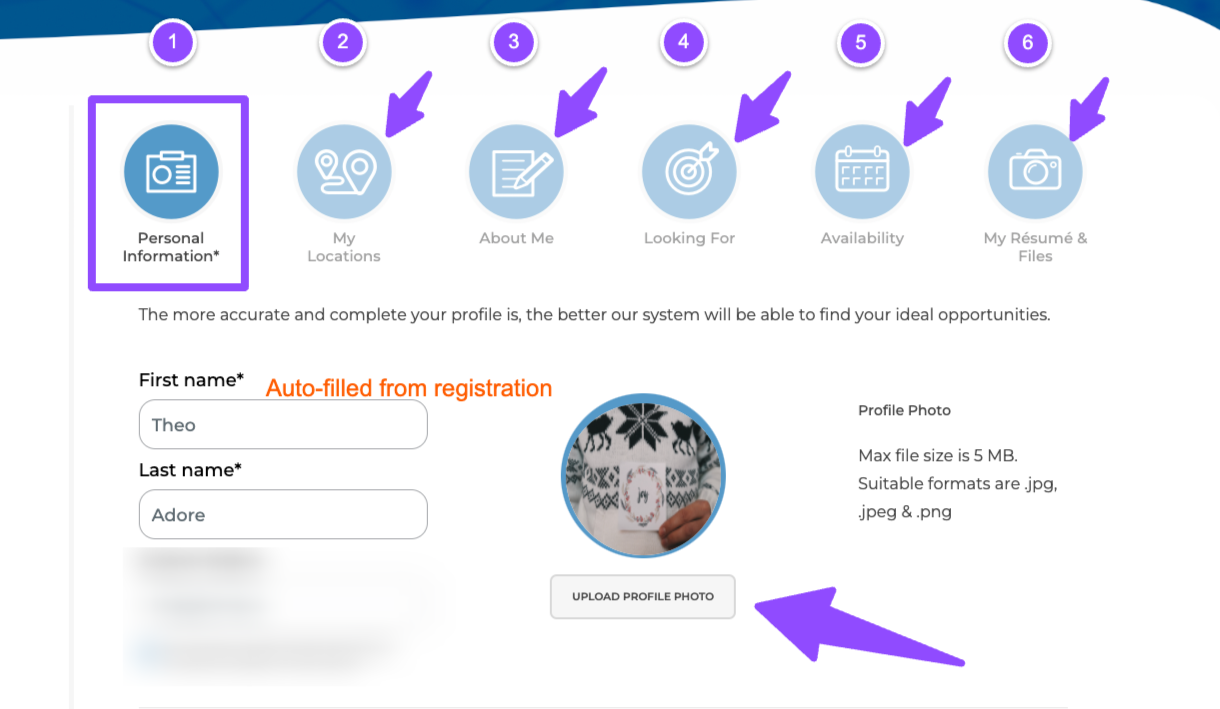
Setting up your volunteer profile on Volunteer Success is crucial as it is the first thing organizations see when you apply for an opportunity. A complete profile will help your ideal organization find you & help you connect to the perfect opportunity. Here are the 6 steps you should take to set-up your volunteer profile:

Step 1: Fill in Your Personal Information
In this section, you should provide up-to-date and accurate personal information, including your full name, screen name, profile picture. You are also encouraged to include links to your social media accounts or personal websites so organizations can get a better understanding of you as a person.

Step 2: Fill in Your Location Details
In this section, you could share your home, work or school location. We recommend you provide your city, state and postal code to ensure your profile shows up in relevant searches and helps you find opportunities within your community. This information is optional but saving at least one address is recommended for best results.

Step 3: Introduce Yourself
In this section, introduce yourself under “My Headline”. Talk about who you are, your top achievements, education, experience, as well as some personal details about yourself that you think would help organizations get to know you. Selecting your top three reasons for volunteering will help organizations know what to expect when they contact you. Lastly, choose your top 5 soft skills, skills and experience, as well as your spoken languages.

Step 4: Fill in Your Desired Volunteer Roles
In this section, the information you provide will be used to help you find the most relevant opportunities. Fill in your preferred locations, preferred type of activities, communities and age groups you would like to serve, as well as what languages you can support.

Step 5: Choose your Preferred Times
In this section you should specify your availability by indicating the days and times you are available to volunteer.

Step 6: Upload Your Resume
Finally, you have the option to upload a current resume that highlights your skills, education, and experiences. Your resume will only be visible to an organization when you apply for an opportunity. You should upload files that you want to feature, as this gives organizations a more in-depth look at your background and allows them to better assess your suitability for various volunteering roles. You may also add any documents or photos that you think will help your applications here as well.
Great job! Now that you’ve set-up your profile, it’s time to start looking for volunteer opportunities. Click Here to learn more about how you can find volunteer opportunities online. If you have any other questions, we’re here to help! Contact us at support@volunteersuccess.com